Each bank sets its own fees and limits for FPS transfers in Hong Kong

The Faster Payment System (FPS) is the payment system the Hong Kong Monetary Authority (HKMA) launched on September 17, 2018. All banks and e-wallet operators in Hong Kong can take part, so a payer who enters the recipient’s mobile phone number or email address can send money across banks and e-wallets, with the funds available to the recipient almost immediately. It operates around the clock, seven days a week, in Hong Kong dollars and renminbi.
The FPS itself puts no figure on what a transfer costs or how much can go in one payment. The FAQ published by Hong Kong Interbank Clearing Limited (HKICL) leaves both to banks and stored-value facilities (SVFs, the operators behind e-wallets), while for the northbound limit under Payment Connect it gives exact amounts, set out in section 06.
Two official pages are behind the rules below: the HKMA’s Faster Payment System (FPS) page, last revised on July 10, 2025, and HKICL’s frequently asked questions for FPS consumers. An A-number in brackets, such as A7, is the number of the answer on that FAQ page.
01Which banks and e-wallets does FPS connect, and in which currencies?
Participation is open to all banks and e-wallet operators in Hong Kong. On coverage, HKICL’s FAQ says almost all retail banks, and SVFs with e-wallets, provide instant payment service via the FPS.
Money can move from bank to bank, from a bank account to an SVF or from an SVF to a bank account, and between two SVFs, provided the institutions on both ends support FPS payments. The currency is Hong Kong dollars or renminbi.
Using it follows one general pattern: log on to your mobile banking, internet banking or SVF payment app and look for the fund transfer function that displays the FPS name or logo. The specific scope, channel and interface of the service may vary from one bank or SVF to another.
“Instant” has an exception. All banks in Hong Kong can receive funds transferred via the FPS, but not all of them can receive funds for their customers instantly. If your bank does not support instant payment, you can still send or receive funds through it, and the transfer takes longer: a few hours, or until the next business day.
02Mobile number, email, FPS ID or HKID: what each FPS proxy can do
To be paid with nothing more than an identifier, you have to register it first. Once your mobile number or email address is registered with a bank or SVF e-wallet, or a bank or SVF e-wallet has generated an FPS ID for you, a payer can enter any of them to send you funds. An HKID number can be registered as a proxy too. The four follow quite different rules:
| Proxy | Where it comes from | How many accounts it can link to | Use and limits |
|---|---|---|---|
| Mobile number | Your own number, registered with a bank or SVF | More than one bank or SVF; with several linked, you can specify one as the default account for receiving funds | The payer enters the number to send funds (HKMA page) |
| Email address | Your own email address, registered with a bank or SVF | As with a mobile number: more than one, with one specified as the default | Used the same way as a mobile number |
| FPS ID | A 7- or 9-digit string of numbers generated by the FPS system; requested through mobile or online banking or an e-wallet, subject to the service each bank or SVF provides (A10) | Each FPS ID links to one bank or e-wallet account only | The payer enters the digits to send funds |
| HKID number | Your own Hong Kong identity card number; every bank that supports mobile number and email registration supports this registration too | One sole-name bank account; joint accounts are not allowed | For institutions that already hold your HKID number to make payments to you; not intended for person-to-person payments |
The third column is where a mobile number and an FPS ID part ways. A mobile number can sit with several institutions at once, and when the payer names none of them, the money goes to the default. An FPS ID belongs to a single account.
The HKID row is the narrowest. It plays no part in transfers between friends and exists for institutions paying money out. Moving it to a different account means registering again, and the new registration supersedes the existing record.
What registration passes to the FPS is your name, your mobile number and the name of your bank or SVF. Account numbers are not registered with the FPS.
A payment to a mobile number or email address that has not been registered will be rejected. When someone tells you their phone number is all you need, you can ask them to confirm the registration in their own bank or e-wallet app first.
03One mobile number linked to several banks: which account gets the money?
A mobile number can be linked to more than one bank or SVF. With several linked, you can specify one of them as the default account for receiving funds, and that is where the money goes when the payer does not name a particular bank or SVF. There is no need to link the number or email address to every account you hold; register only the ones you want to receive into.
To see the default, log in to any of your mobile banking, online banking or e-wallet apps. Each one shows all the FPS registrations linked to the same mobile number or email address, and which bank or SVF is the default.
The default can change at two points. When you register a further bank or SVF with the same mobile number or email address, you are given the option during registration of making the newly registered account the default, and the default changes only if you agree. To change it later, log in to the bank or e-wallet you want as the default and change the setting there. After a change, the old default and the new one notify you by the method you have chosen for these notifications, if you have chosen one.
If a notice of a default-account change arrives when you have changed nothing, ask the institution through its official app or official phone line, and don’t click any link in the notice.
04How much does FPS cost, and how much can you send at once?
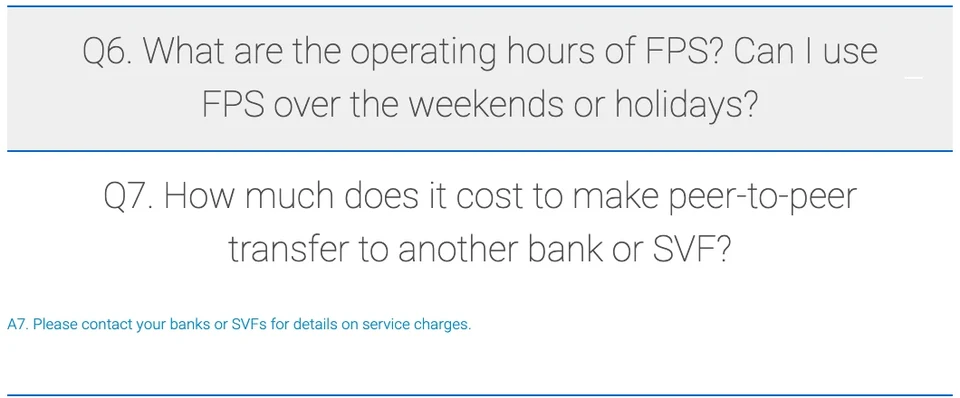
On fees, answer A7 in HKICL’s FAQ is a single sentence that does not use the word free: “Please contact your banks or SVFs for details on service charges.”
On limits, A25 says banks and SVFs have defined different thresholds for various types of payment or transfer, based on their business models and risk control management; it refers you to them for details and gives no Hong Kong-wide figure per transaction or per day.
Limits come up again under security. The FPS operators, banks and SVF licensees are all under the HKMA’s oversight and are required to implement security measures; the two examples given are two-factor authentication and a default transaction limit for funds transfers over a certain threshold.
05Sent an FPS payment to the wrong account, or the payee hasn’t received it?
Checking belongs before you confirm. Users are asked to verify the payee’s name and the amount before sending a payment. At that point the sender may see the payee’s masked name and, when the receiving account is not the default one, the name of the bank or SVF. If the name doesn’t match, don’t confirm.
If the money has already gone to the wrong account, contact the recipient first. If you can’t reach them, inform your own bank or SVF as soon as possible and ask for its help.
If the payee says nothing has arrived, the payer first goes back over the payment instruction to see whether the proxy and the amount were entered correctly. Next, the payer asks the paying bank or SVF for the FPS transaction reference number and passes it to the payee to follow up. On the payee’s side, the thing to look at is which bank or SVF is set as the default account, since the money may have gone there rather than to the account being watched. And if the payer’s or the payee’s bank does not support instant payment, the transfer can take a few hours or until the next business day, as section 01 notes.
06Payment Connect northbound limit: HK$10,000 a day, HK$200,000 a year, per participating institution
FPS has two links beyond Hong Kong: Payment Connect, which links it with the Mainland’s Internet Banking Payment System (IBPS), and a QR code link with Thailand’s PromptPay. Person-to-person remittance under Payment Connect runs in two directions.
Northbound is Hong Kong to the Mainland. Hong Kong Identity Card holders can transfer funds to a Mainland payee through participating institutions in Hong Kong. The Mainland payee is identified by mobile number or bank account number; email address and FPS ID are not among the options.
Southbound is the Mainland to Hong Kong, with the Hong Kong payee receiving through a participating institution. The payer can identify the Hong Kong payee by mobile number, email address, FPS ID or bank account number, two more options than northbound.
For this cross-boundary service, A71 gives figures. On northbound person-to-person remittance, the daily limit is HK$10,000 per person and the annual limit is HK$200,000, for each participating institution. That limit is “segregated from” the existing daily remittance limit of RMB 80,000 that applies to same-name remittance. At HK$10,000 every day through one participating institution, 200,000 ÷ 10,000 = 20, so the annual limit at that institution is used up on the 20th day. Southbound transfers come under the existing facilitative foreign exchange annual quota of USD 50,000 per person.
On Payment Connect fees, A70 says the service is provided by participating institutions and that you can ask them for details of the service fees. Costs on other routes, such as wire transfers, are the subject of How to cut cross-border transfer fees.
07FPS on weekends, receiving without registering, and whether payers must register
Does FPS work on weekends and public holidays? Yes. FPS operates 24/7 throughout the year, including weekends and holidays. For what a particular bank or SVF offers on those days, the FAQ says to check with that institution.
Can I receive money without registering for FPS? Yes. The payer skips the proxy and enters your name, the name of your bank or SVF, and your account number. Registering a proxy spares you from giving out the account number.
Does the payer have to register too? FPS does not require senders to register, but participating banks or SVFs may ask their customers to register before they can send payments.
- Hong Kong Monetary Authority: Faster Payment System (FPS) — the September 17, 2018 launch, participation by all banks and e-wallet operators, round-the-clock operation and support for the Hong Kong dollar and the renminbi; the page gives July 10, 2025 as its last revision date
- Hong Kong Interbank Clearing Limited: FPS frequently asked questions for consumers — the four proxies, the default account, fees (A7) and limits (A25), wrong and missing payments, Payment Connect directions and limits (A67–A71)